ok, have you heard of Class Dojo and just didn’t feel up to it? Dive on in! The water is fine! I heard about the online management tool last year from a fellow teach who thought it would be up my alley. I was reluctant. I liked my card flipping. I didn’t do it.
this year. I was all set for clip chart with my Whole Brain teaching scoreboard. Used scoreboard very successfully the first 2 weeks on school. I planned on adding more individual management with my clip chart {or practice cards} the coming Monday. Threatened rowdy students with it!
Then my middle Lamb comes in after school and says “why aren’t you using class dojo? Your kids would be better if you did!” {my kiddos are great fyi-he just wants to be better than us!}
Then at our staff meeting, my teammate {who had been using it all year and is my son’s teacher} presented it to us. I was hooked! Oh.EM.GEE. The number one feature that got me was the parent reports. Ugh. Can I tell you I hate writing behavior reports in our Thursday folders! I have just slopped something down since I write anything major in the daily planners. Just a waste of my time.
Here’s a little rundown for you. I am sorry it’s not a catchy, appealing video tutorial. I still am not sure where CamStudio saves my stuff…
go to classdojo.com
here’s my class


Now for the management during class. Little Jake is grabs his book box and gets to reading at his own little spot right away. I need to let him know I noticed because the rest of the kiddos are still roaming around.

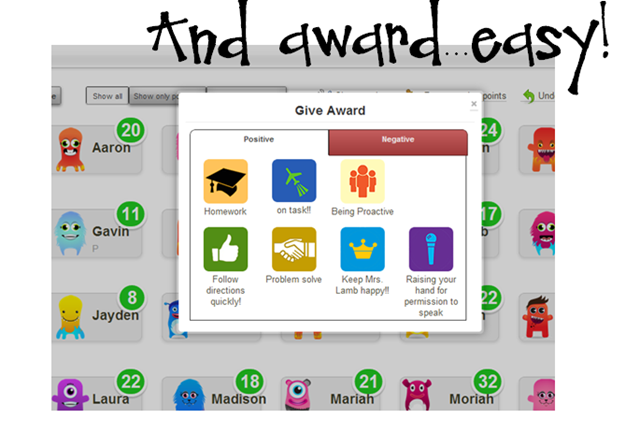
not that it ever happens, but if little Jake wasn’t following directions, I’d just go to negative instead.

and here’s what’s on my tv screen. DING is the positive sound. Enter the Pavlov dog experiment period. Serious;y, everyone is on task now and I never said a word. My fear with this was that I want kids to physically go and MOVE something positive or negative. That’s why I like clip charts and flipping. But I can still get that! I can have kids award positives for themselves, or negatives. They just go and click the mouse.
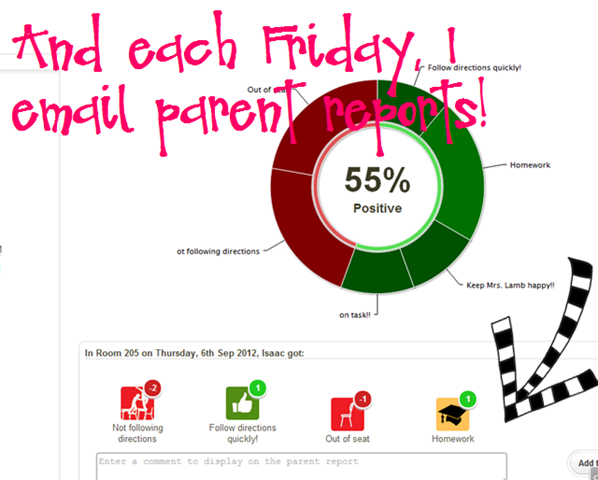
Now for the reports. I use 2 at the moment. First is the class report I share daily with students. If we beat the number of positives from the previous day, we earn a paw. {our mascot is a bear cub-We are a PBIS school and we have to hand these out schoolwide for good behaviors}

but I can also print or email individual reports to parents!! yay!! I can add daily notes too if I want
But the BEST feature BY FAR is using my iPhone as a remote! Holy smokes!
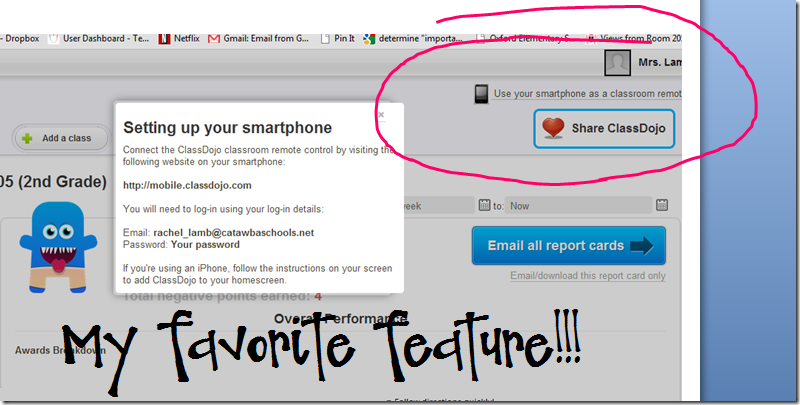
the first day I used it I was in the hallway as they were unpacking. Suddenly they hear the dreaded DONG on the negative…all eyes are sweeping the room. How’d she do that??? I shared that my phone is right here with me all day, I can award from the restroom, cafeteria, lab, hall, anywhere! If I’m in the room, they see it on the screen, if we are out of the room, they notice their totals. They are very focused on these.
and fyi-you must be in IE on your PC to get the smartphone remote to work. Who knows. quirky technology!
Here’s what it looks like

Why? Every other Friday, they buy coupons with their points.
Our first store is tomorrow. Points will be cleared and spent. I am using Christie’s prize pass catalog because they are not tangible items I have to buy and they love them. We added a few specific things, too. Nothing is over 30 points or under 10. I am choosing to clear them out because I do not want them to get to 30 and just quit.
And my parents love it too. They can {and do} go online anytime and see what’s up.
well, I hope I have at least convinced you to visit the site, or even give it a try! And I am still using wbt rules and other features. I normally stop using scoreboard in September anyhow.
Happy managing!!


